
WiFi vs Ethernet: Real Speed Comparison
The Fundamental Difference
WiFi transmits data using radio waves through the air. These waves must compete with interference from other devices, physical obstacles, and distance degradation. Ethernet transmits data through a physical copper cable using electrical signals that are completely shielded from outside interference.
Think of it this way: WiFi is like shouting across a crowded room. Your message gets there, but it competes with other conversations, echoes off walls, and gets garbled by background noise. Ethernet is like a private telephone line directly to the other person. The connection is dedicated, clear, and consistent.
Signal Path Comparison
Head-to-Head Performance Comparison
| Metric | WiFi (5GHz, same room) | WiFi (5GHz, 2 rooms away) | Ethernet (Cat6) |
|---|---|---|---|
| Download Speed | 85 to 95% of plan speed | 40 to 70% of plan speed | 98 to 100% of plan speed |
| Latency (Ping) | 3 to 10ms added | 8 to 25ms added | 0 to 1ms added |
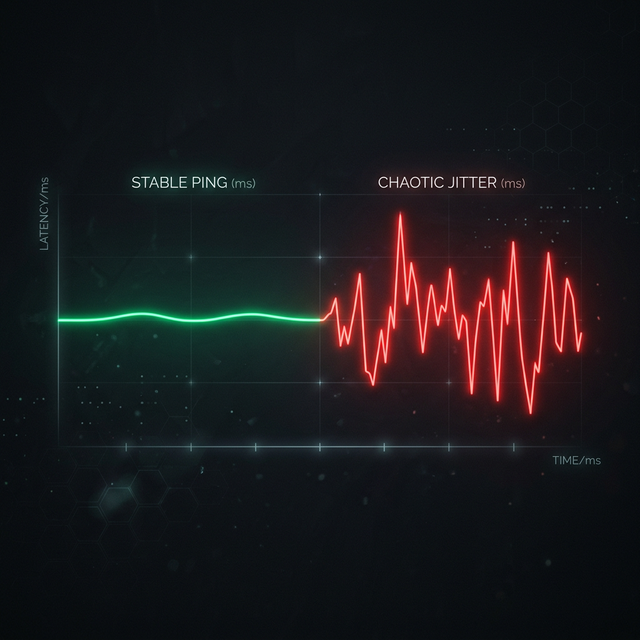
| Jitter | 5 to 15ms typical | 15 to 40ms typical | 0 to 2ms typical |
| Packet Loss | 0.1 to 1% | 1 to 5% | 0% |
| Consistency | Variable | Highly variable | Rock solid |
Why WiFi Is Inherently Less Stable
WiFi operates on shared radio frequencies (2.4 GHz and 5 GHz). In any given area, your router is competing with every other router, Bluetooth device, baby monitor, cordless phone, microwave oven, and even car key fob within range. Each of these devices creates radio interference that forces your WiFi adapter to retransmit packets, wait for clear airtime, or negotiate a lower link speed.
Additionally, WiFi uses a protocol called CSMA/CA (Carrier Sense Multiple Access with Collision Avoidance). Before transmitting, your device must listen to the airwaves and wait until no one else is broadcasting. In a dense apartment building with 20 routers visible, your device spends a significant amount of time just waiting for its turn to speak. This waiting directly translates into increased latency and reduced throughput.
Physical obstacles further degrade WiFi. The 5 GHz band, while faster, loses roughly 50% of its signal passing through a single drywall wall. Concrete, brick, and metal are even worse. The 2.4 GHz band penetrates walls better but is far more congested because it only has 3 non-overlapping channels and because older devices, microwaves, and Bluetooth all operate on 2.4 GHz.
When WiFi Is Perfectly Fine
Despite Ethernet's clear superiority in raw performance, WiFi is completely adequate for the vast majority of everyday internet activities. Here is when WiFi is totally fine:
- Web browsing and email: These activities are so lightweight that even degraded WiFi handles them effortlessly.
- Video streaming (Netflix, YouTube): Streaming services buffer 5 to 30 seconds of video ahead, so momentary WiFi hiccups are invisible to you.
- Social media: Scrolling Instagram or TikTok is not latency-sensitive.
- Music streaming: Audio requires minimal bandwidth and buffers heavily.
- Casual gaming (turn-based, single-player): Games that are not real-time competitive tolerate WiFi jitter without issue.
When You Absolutely Need Ethernet
- Competitive online gaming: In fast-paced shooters like Valorant, CS2, or Fortnite, the 5 to 15ms of extra jitter from WiFi can mean the difference between winning and losing a gunfight.
- Professional video calls: If you present to clients or attend important meetings, the occasional WiFi freeze or audio dropout is unprofessional and avoidable.
- Live streaming to Twitch/YouTube: Dropped frames from WiFi instability are visible to your audience and look terrible.
- Large file transfers: Backing up 500 GB to a NAS over WiFi could take 10x longer than over Ethernet due to speed and consistency limitations.
- Working from home with VPN: Corporate VPNs are sensitive to packet loss and jitter. WiFi instability causes frequent VPN disconnections and slow remote desktop performance.
"WiFi is about convenience. Ethernet is about performance. For most people, WiFi is good enough. For anyone who depends on their connection being reliable, Ethernet is non-negotiable."
Alternatives When Ethernet Cable Routing Is Impossible
Powerline Adapters: These clever devices use your home's existing electrical wiring to carry network data. You plug one adapter into an outlet near your router (connected via Ethernet) and another into an outlet near your device. Performance varies wildly depending on the age and quality of your electrical wiring, but in most modern homes, they deliver 70 to 150 Mbps with much lower jitter than WiFi.
MoCA Adapters (Multimedia over Coax Alliance): If your home has coaxial cable outlets (from an existing cable TV installation), MoCA adapters convert them into Ethernet ports. These are generally faster and more reliable than powerline adapters, often delivering 500+ Mbps with Ethernet-like stability.
Mesh WiFi Systems: While still WiFi, mesh systems like Google Nest WiFi, Eero, or ASUS ZenWiFi use multiple access points spread throughout your home to ensure strong signal coverage everywhere. They do not eliminate WiFi's inherent latency, but they significantly reduce the speed and stability penalties caused by distance and obstacles.
Frequently Asked Questions
Does the Ethernet cable type matter?
For typical home use, Cat5e supports speeds up to 1 Gbps and is perfectly adequate. Cat6 supports up to 10 Gbps over short distances and offers slightly better shielding. Cat7 and Cat8 are overkill for home networks. Do not waste money on expensive "gaming" Ethernet cables. A basic $8 Cat6 cable performs identically to a $50 branded one.
Is WiFi 6E as good as Ethernet?
WiFi 6E is a significant improvement over older WiFi standards, offering a new 6 GHz band with less congestion and lower latency. In ideal conditions (same room, line of sight, no competing devices), WiFi 6E can approach Ethernet-like performance. However, it still cannot match Ethernet's zero-interference consistency through walls and over distance. For the highest possible reliability, Ethernet remains superior.
Can I use both WiFi and Ethernet simultaneously?
Yes! Most devices will automatically prioritize the Ethernet connection for maximum performance while keeping WiFi connected as a fallback. This is the ideal setup for laptops: plug in Ethernet at your desk for gaming and calls, then seamlessly switch to WiFi when you move to the couch.
Related Tools
Live Speed Test
Measure your exact connection speed in Mbps right now.
Wi-Fi Speed Test
See how much speed your wireless connection is losing.
Continue Reading

How to Reduce Ping: 12 Proven Methods
What is Jitter? A Simple Guide to Network Stability

How to Fix Packet Loss in Gaming
Is your connection unstable?
Don't just guess. Use our real-time monitor to see exactly what's happening with your download, upload, and ping variance right now.
START REAL-TIME TEST