
Gaming Speed Test
Standard speed tests don't tell the whole story. Our real-time monitor tracks the stability of your connection continuously, helping you find the root cause of lag spikes, rubberbanding, and hit registration failures.
Ready to test your Gaming connection?
Our continuous real-time monitor runs directly in your browser. Uncover hidden latency, jitter, and verify your connection stability.
Launch Real-Time Speed TestWhy Bandwidth Doesn't Matter for Gaming
If you have ever experienced terrible lag despite paying for a "Gigabit" internet plan, you already know the dirty secret of ISPs: download speed does not equal gaming performance.
Online gaming uses incredibly little data. Games like Valorant, CS2, and Fortnite only transmit tiny text files containing player coordinates and actions. This requires less than 3 to 5 Mbps of bandwidth. Having a 1000 Mbps connection does not make those tiny packets travel any faster.
What actually determines a lag-free experience is Network Stability. Your packets need to reach the server and come back in a straight, uninterrupted line, thousands of times a minute. To measure this, you need to look at three specific metrics: Latency (Ping), Jitter, and Packet Loss.
The Three Pillars of Gaming Network Health
01 // Ping (Latency)
The time it takes for a packet to travel to the game server and back. High ping causes delayed reactions. If you shoot a target but they move before your shot registers, that's high latency. Under 30ms is ideal for competitive shooters.
02 // Jitter
The variance in your ping. If your ping is 20ms, then 80ms, then 30ms—you have high jitter. This inconsistency confuses the game's prediction engine, resulting in micro-stutters and jerky enemy movements. Jitter should be kept under 5ms.
03 // Packet Loss
When data sent to the server never arrives. The game forces you back to your last known position to correct the error, causing the dreaded "rubberbanding" effect. Packet loss must be strictly 0.0% for a smooth experience.
The Silent Killer: Bufferbloat
Have you ever noticed your ping is perfect until someone else in the house starts watching 4K Netflix or downloading a massive Steam update? Suddenly, your ping spikes to 300ms and the game is unplayable. This phenomenon is called Bufferbloat.
When your network gets busy, your router tries to be helpful by putting packets into a "buffer" queue instead of dropping them. Unfortunately, routers are terrible at prioritizing. Your tiny, time-sensitive gaming packets get stuck at the back of the line behind massive video streaming packets.
How to Fix Bufferbloat
- Enable QoS (Quality of Service): Most modern routers have a QoS setting. This allows you to prioritize traffic to your gaming PC or console over other devices.
- Use SQM (Smart Queue Management): Advanced routers (like those running OpenWrt or modern mesh systems) use SQM algorithms (like fq_codel or CAKE) that automatically prevent any single device from monopolizing the buffer queue.
- Cap your bandwidth: If you don't have SQM, artificially limiting your maximum download/upload speeds in your router to 90% of your actual capacity prevents the buffers from ever filling up entirely.
4 Steps to Lower Your Ping Instantly
Ditch the Wi-Fi. Use Ethernet.
Wi-Fi is a half-duplex radio signal. It is subject to interference from walls, microwaves, and your neighbor's router. It is the #1 cause of jitter and packet loss. Running a cheap Cat6 Ethernet cable from your router to your PC is the single biggest upgrade a gamer can make.
Change your DNS Servers
Your ISP's default DNS servers are often slow and overloaded. While DNS doesn't lower your in-game ping, it drastically speeds up how fast your game connects to matchmaking services and lobbies. Switch to Cloudflare (1.1.1.1) or Google (8.8.8.8).
Select the Right Region
Never use "Auto-Select" for matchmaking regions if you can avoid it. Always manually lock your game to the server physically closest to you. The speed of light is a physical limit; you cannot get 20ms ping to a server 3,000 miles away.
Beware of "Gaming VPNs"
Services promising to lower your ping via a VPN are largely marketing myths. Adding a middleman to your connection usually increases latency. They only work in rare edge-cases where your ISP is routing your traffic terribly, and the VPN forces a more direct physical path.
Gaming Network FAQ
What is a good ping for gaming?
Does higher download speed lower my ping?
Will a gaming VPN fix my lag?
Why does my ping spike when someone else watches Netflix?
Is Wi-Fi 6 good enough for gaming?
Continue Reading

How to Reduce Ping: 12 Proven Methods
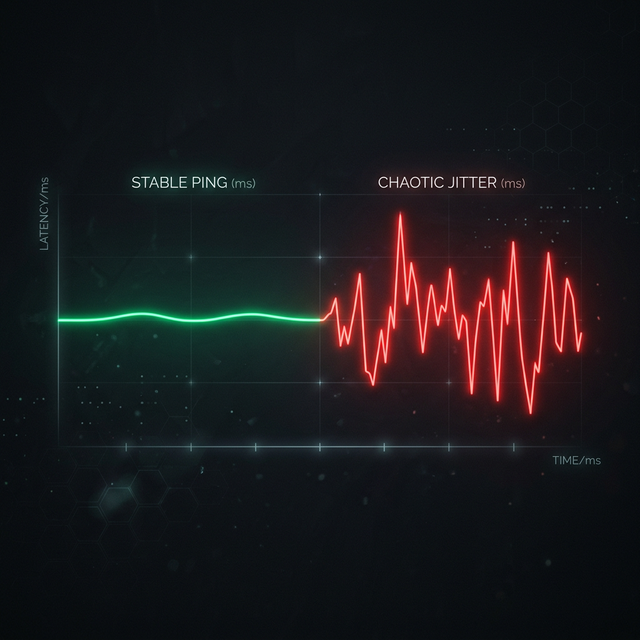
What is Jitter? A Simple Guide to Network Stability
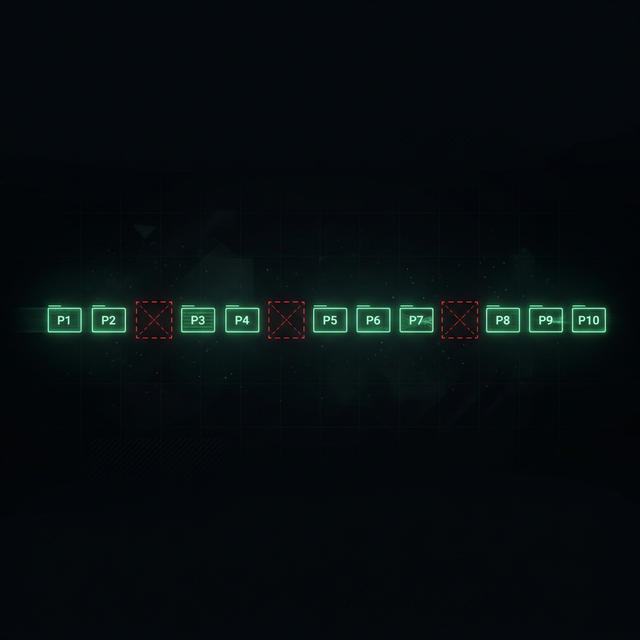
How to Fix Packet Loss in Gaming
Is your connection unstable?
Don't just guess. Use our real-time monitor to see exactly what's happening with your download, upload, and ping variance right now.
START GAMING PING TESTMeasure Your True Jitter Score
We just launched MyJitter.com, a specialized tool built exclusively for competitive gamers to analyze network stability and rank their connection.