
Starlink Speed Test: Is Satellite Internet Good for Gaming in 2026?
Measure Your True Jitter Score
We just launched MyJitter.com, a specialized tool built exclusively for competitive gamers to analyze network stability and rank their connection.
The LEO Advantage: Why Distance Changes Everything
Traditional satellite internet (HughesNet, Viasat) uses geostationary satellites orbiting at 22,236 miles above Earth. Data has to travel 22,000 miles up, then 22,000 miles back down — a round trip of 44,000 miles. Even at the speed of light, this physical distance creates a minimum latency of approximately 600ms. No algorithm or software trick can overcome the speed of light. At 600ms, you would see an enemy in a shooter a full 0.6 seconds after they actually appeared — an eternity that makes competitive play impossible.
Starlink satellites orbit at just 340 miles above Earth. This massive 65x reduction in distance brings the theoretical minimum round-trip ping down to under 15ms. In real-world testing throughout 2026, most Starlink users see between 25ms and 45ms. For most gamers, this places Starlink firmly in the "Competitive Tier" — nearly identical to a standard Cable connection and dramatically better than the old satellite internet experience.
| Connection Type | Orbit Altitude | Typical Ping | Gaming Verdict |
|---|---|---|---|
| Fiber (FTTH) | N/A (ground) | 5 – 15ms | Best possible |
| Cable (DOCSIS) | N/A (ground) | 15 – 40ms | Excellent |
| Starlink (LEO) | 340 miles | 25 – 45ms | Good (competitive) |
| 5G Home | N/A (tower) | 20 – 60ms | Variable |
| HughesNet (GEO) | 22,236 miles | 600ms+ | Impossible for gaming |
The Starlink Challenge: Satellite Handoffs and Jitter
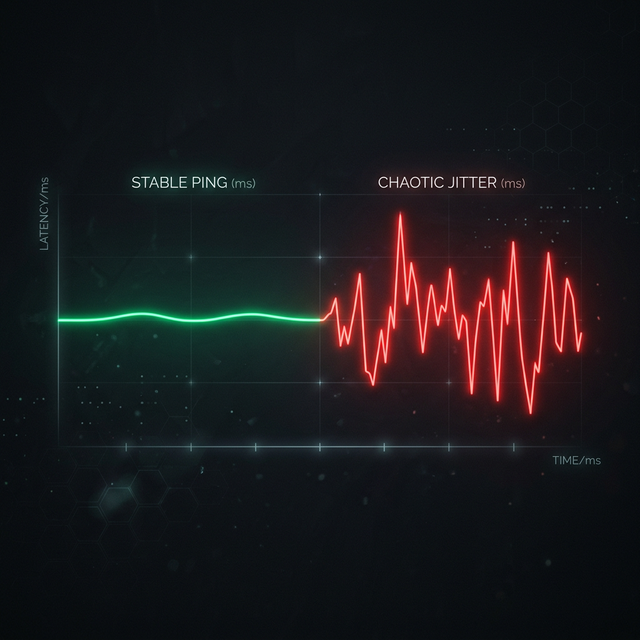
While Starlink's average ping is competitive, the consistency can be an issue. Because LEO satellites move across the sky at 17,000 mph, your dish must constantly switch between satellites as they pass overhead. These "handoffs" can cause brief jitter spikes of 50-200ms lasting 0.5 to 2 seconds. Netflix buffers through these seamlessly, but a competitive game will register them as a momentary freeze or teleport.
SpaceX has significantly improved handoff smoothness throughout 2025-2026 with software updates, and the increasing density of the satellite constellation (now over 6,000 satellites) means each handoff is shorter and smoother. Most users now experience only 2-3 noticeable handoffs per hour, compared to 10-15 per hour in 2023.
Pro Tip: The Obstruction Check
Gaming on Starlink requires a 100% clear view of the sky. A single tree branch can cause a 0.5-second "micro-outage" that is invisible to streaming but devastating to gaming. Use the Starlink app's "Obstruction Tool" to ensure a perfect 360-degree field of view. If even 0.1% obstruction is reported, consider mounting the dish higher. The difference between "slight obstruction" and "no obstruction" can be the difference between playable and unplayable gaming.
Starlink Performance by Game Genre
MMOs (WoW, FFXIV, ESO)
MMOs are the most tolerant of latency variation. The tick rates are low, and most combat is not frame-precise. Starlink is virtually indistinguishable from cable for MMO gameplay, including raiding and dungeons.
Battle Royale (Warzone, Fortnite, Apex)
Generally playable with occasional hiccups during satellite handoffs. The higher TTK (time-to-kill) in BRs compared to tactical shooters gives you more margin for brief jitter spikes. Casual to mid-tier competitive play is comfortable.
Tactical Shooters (Valorant, CS2)
The most demanding genre for latency consistency. A single 200ms jitter spike during a 1v1 duel can cost you the round. Playable for casual ranked, but high-level competitive play (Immortal+ / Global) will feel inconsistent.
Racing & Sports (Rocket League, FC 26)
These games rely on continuous, precise input. Starlink's baseline ping is fine, but satellite handoff jitter can cause the ball or car to briefly "snap" to a different position, which feels terrible in fast-paced competitive play.
The Future: Inter-Satellite Laser Links
Starlink's Version 2 satellites use inter-satellite laser links (ISLs). This allows data to travel through the vacuum of space between satellites before reaching a ground station. Light travels 47% faster in vacuum than it does through fiber optic glass, which means for long-distance connections (like playing on servers across the ocean), Starlink could eventually offer lower international ping than traditional fiber optic cables.
For example, a London-to-Tokyo connection over undersea fiber has a minimum latency of approximately 220ms. The same connection routed through Starlink's laser mesh in vacuum could theoretically achieve under 150ms — a 30% improvement that would be revolutionary for international esports and gaming communities connecting across continents.
"In 2023, Starlink was a curiosity for rural gamers. In 2026, it is a legitimate alternative to cable. By 2028, its laser mesh might make it faster than fiber for international gaming."
Frequently Asked Questions
What is the average ping on Starlink?
In 2026, most Starlink users see 25ms to 45ms ping. While higher than fiber (5-15ms), it is dramatically better than the 600ms+ of old geostationary satellite services. For most games, this is well within the competitive range.
Does rain affect Starlink gaming?
Heavy rain or snow can cause "micro-outages" where the signal degrades for 0.5-2 seconds, resulting in increased jitter or brief disconnects. For casual gaming and streaming, it is typically fine. For competitive ranked play during a thunderstorm, you may experience occasional dropped connections.
Is Starlink better than 5G for gaming?
In rural areas, Starlink often has more consistent latency than 5G because mobile towers in sparse areas can become congested quickly with few users. In urban areas, 5G typically has lower idle ping (10-20ms) but can spike during peak hours. If you are in a rural area with no fiber, Starlink is usually the better gaming choice.
Can I use Starlink for game downloads?
Absolutely. Starlink's download speeds typically range from 100-250 Mbps, which is more than enough for downloading large games. A 100 GB game would take approximately 30-60 minutes, comparable to a mid-tier cable connection.
Related Tools
Live Speed Test
Measure your exact connection speed in Mbps right now.
Wi-Fi Speed Test
See how much speed your wireless connection is losing.
Continue Reading

What Is Latency? Everything You Need to Know
What is Jitter? A Simple Guide to Network Stability
What is a Good Ping for Valorant, CS2, and Fortnite?
Is your connection unstable?
Don't just guess. Use our real-time monitor to see exactly what's happening with your download, upload, and ping variance right now.
START REAL-TIME TEST